Keeping your backup power reliable isn’t rocket science—it just takes a little planning, sizing things right, and actually testing your setup now and then. For most Sacramento-area homeowners, the best way to keep backup power systems dependable is to protect only the loads that really matter, then build a setup that actually fits your home, battery storage, or generator needs.
Routine care pays off during power outages, especially when you want emergency power that kicks on fast and works like you expect. Whether you need backup for medical devices, the fridge, lights, internet, or a sump pump, the goal is pretty simple: reliable performance when it counts.
Key Takeaways
- Protect only the loads that matter most.
- Test your system under real conditions.
- Keep batteries, fuel, and schedules on track.
Start With The Loads You Actually Need To Protect
The easiest way to get reliable backup power at home? Size it around your must-haves, not your wish list. Once you know which circuits are truly critical, you can match battery capacity, surge output, and runtime to the types of outages you’re most likely to face.
Separate Critical Loads From Whole-Home Expectations
Jot down the stuff you’d want running during an outage: fridge, internet, furnace blower, medical gear, garage door opener, maybe a few lights. That list is usually way shorter than “power the whole house”—and that’s actually a good thing. It means your home backup battery or generator won’t get overloaded.
A home battery system (or battery banks) should be sized for protection, not convenience. If you try to run everything, you’ll drain the batteries fast and lose the most important stuff first.
Match Runtime Goals To Short And Extended Outages
Think about the outages you actually get—quick blips? Storms? Wildfire shutoffs? A system that covers a few hours might be perfect for short events, but longer outages may call for bigger battery storage or a generator backup option.
Your runtime goal should fit your family’s routine. If you only need power to keep food cold, charge phones, and keep internet running until the grid comes back, you can keep things simple and more reliable.
Check Battery Capacity And Surge Demands Before You Buy Or Test
Battery capacity tells you how long your backup lasts. Surge demand tells you if it can start a fridge or well pump. Motors and compressors need a lot more power to start up than just to run.
Before you buy or test, make sure your backup battery can handle both the steady load and the quick startup spike. If the surge rating’s too low, the system might just shut down—even if the battery isn’t empty.
Choose A Layered Setup That Stays Dependable
The most reliable backup setups are usually layered—each part handles a different job. Battery backups keep sensitive electronics running quietly, generators cover longer outages, and a UPS bridges the gap during switching.
When Battery Backup Makes More Sense Than Generators
Battery backup systems are great when you want quiet, clean indoor installation, and instant response. They’re a solid fit for folks who need emergency power for electronics, lighting, garage doors, or a few essentials—without the noise or hassle of fuel.
Generators still have a place, especially for longer runtime and heavier loads. But battery storage gives you fast, low-maintenance support. In Sacramento, Roseville, Folsom, and nearby, battery backup is a practical piece of energy independence.
How Solar Charging Supports Battery Storage
Solar charging can help your batteries recover during the day, especially if the outage drags on. That stretches your runtime and means you don’t have to lean on generators or portable gear as much.
A solar generator, portable generator, or power station can also help with smaller loads. Just know what each device can actually power, and use it as part of a bigger plan—not as your only backup.
Where A UPS Fits Into A Home Backup Plan
A UPS (uninterruptible power supply) protects electronics that can’t handle even a quick outage. It’s especially handy for internet gear, desktop PCs, network stuff, and smart devices that need zero interruption.
A UPS isn’t meant to replace a full backup system. It just keeps sensitive devices stable while your battery backup or generator takes over, which helps prevent annoying restarts and data loss.
Test Switching And Real-World Performance Regularly
A backup system only proves itself when it actually works under load, switches right, and recovers cleanly. Regular testing lets you catch weak transfer settings, wiring issues, and runtime problems before a real outage does.
Simulate Outages Under Load Instead Of No-Load Checks
A no-load check might show the lights come on, but it doesn’t prove your system can handle real household demand. To really test it, run the stuff you plan to protect and see if the backup holds up.
If your setup allows, get a licensed electrician or qualified tech to verify safe test conditions as part of backup power system maintenance. That kind of test gives you a much better idea of real-world performance.
Verify Transfer Switch Operation And Return To Utility Power
Transfer switches decide whether your home shifts smoothly from utility to backup and back again. Whether it’s automatic or manual, each one should move cleanly, no weird delays.
Watch the return to utility power, too. If lights flicker, circuits lag, or the system doesn’t transfer back right, you’ve probably got a maintenance issue to fix before the next outage.
Watch For Warning Signs During Runtime Tests
During a test, listen for odd noises, check for warning lights, and watch for voltage or battery alerts. Slow starts, repeated clicking, weak output, or surprise shutdowns can mean battery aging, inverter trouble, or transfer switch problems.
Pay attention to how quickly the system recovers after load changes. That’ll tell you if your backup power is still healthy or starting to struggle.
Maintain Batteries For Longer Runtime And Fewer Surprises
Batteries age quietly—regular checks are your best shot at catching problems before you lose capacity. Good battery habits mean a longer lifespan, fewer emergencies, and more dependable backup when you need it.
Track Battery Health Before Capacity Drops Become Obvious
Keep an eye on runtime, charge speed, and any app or panel readings. If your backup doesn’t last as long as it used to, that’s often an early sign of battery wear—even if everything looks normal.
Battery chemistry matters, too. A lifepo4 pack acts differently than other types, so follow the manufacturer’s advice for charging, storage, and monitoring. Guessing usually doesn’t end well.
Control Heat, Charging Habits, And Temperature Monitoring
Heat kills batteries fast, so keep them in a stable indoor spot if you can. Temperature monitoring helps you catch conditions that quietly wear out batteries, especially in garages, closets, or utility rooms that get too warm.
Good charging habits are important. Avoid deep discharges unless your system is built for it, and keep solar panels clean if you use solar charging—dirty panels mean slower charging.
Plan For Battery Replacement Before End-Of-Life
No battery lasts forever, even with perfect care. Plan for replacement before end-of-life so you’re not scrambling during a storm or outage, when parts are hard to get.
If your system shows weak runtime, slow recovery, or repeated alerts, schedule service early. That keeps your backup more reliable and lowers your odds of an emergency failure.
Keep Generators Ready With Fuel And Mechanical Care
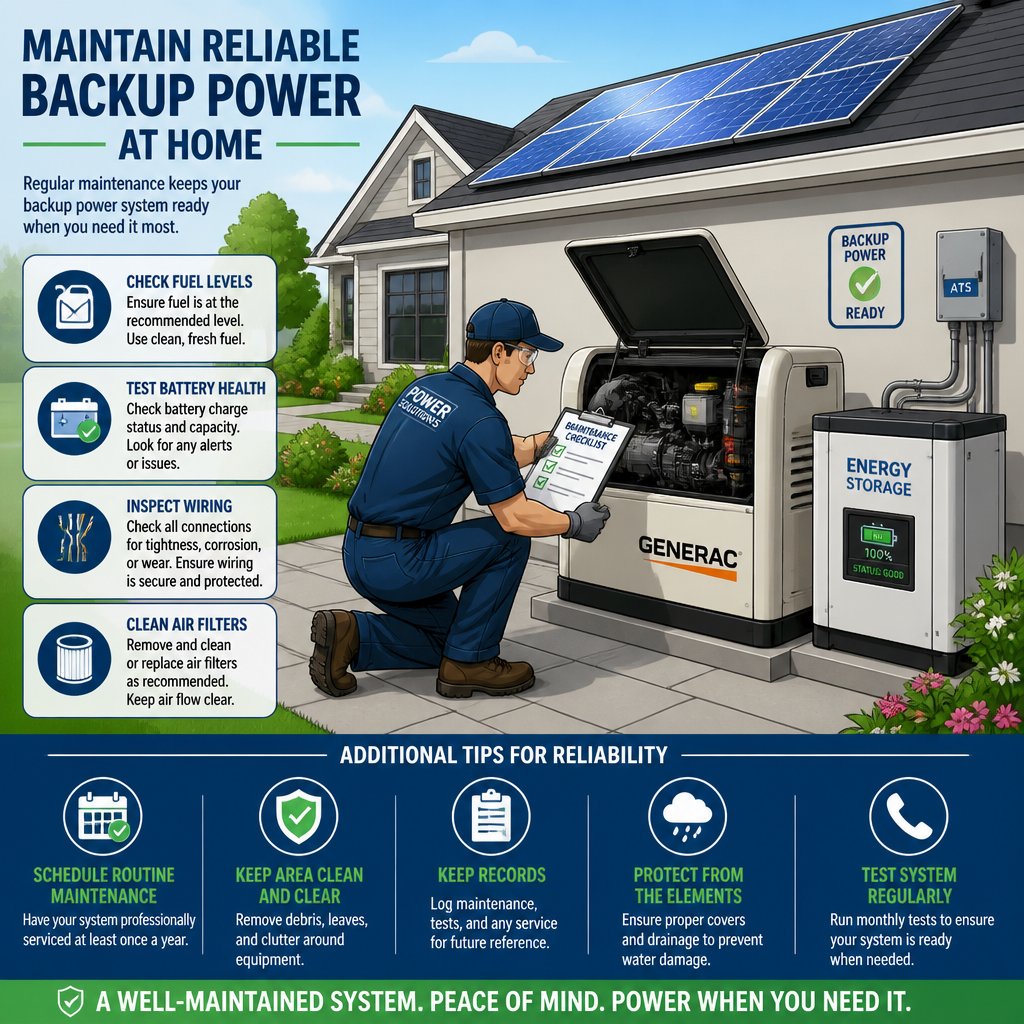
Generators can deliver strong backup power, but they need steady upkeep to stay ready. A simple generator maintenance routine, clean fuel, and a short checklist can prevent a lot of no-start headaches.
Build A Simple Generator Maintenance Routine
Your routine should cover oil, air intake, battery, and exercise runs. Check the unit on a regular schedule, especially before storm season, so you know it’ll start and carry a load when needed.
If you’ve got a standby unit or one of the home generators common in bigger setups, follow the manufacturer’s service intervals. A little attention now beats an emergency repair in a blackout.
Manage Fuel Storage And Fuel Rotation Safely
Store fuel clean, labeled, and in approved containers. Rotate your stock—old fuel breaks down and causes hard starts or shutdowns when you need the generator most.
If you use portable generator fuel, date each container and use the oldest first. Keep fuel away from heat and store it somewhere safe and easy to reach during an outage.
Know When A No-Start Or Rough Run Needs Service
If your generator won’t start, idles rough, smokes, or surges, it needs service—not more guessing. Those symptoms could mean clogged filters, old fuel, battery trouble, or something mechanical.
A licensed electrician or generator tech can figure it out quickly and safely, especially if your system’s tied into the home panel. Fast repairs from a stocked service vehicle make a big difference when your family’s waiting on emergency power.
Create A Home Maintenance Schedule That Is Easy To Follow
A clear schedule keeps you consistent without making backup power maintenance a pain. With monthly, quarterly, and yearly tasks, you can keep your system ready and avoid small problems turning into big ones.
Monthly, Quarterly, And Annual Checks That Matter
Monthly checks: look over things, check app alerts, battery status, and do quick test starts. Quarterly: load tests, fuel rotation, clean enclosures, and check cables, vents, and breakers.
Annual checks go deeper, especially for generator installation, battery storage, or homes with panel upgrades and surge protection. If you’re in Sacramento, Elk Grove, Citrus Heights, or nearby, yearly reviews matter even more with seasonal weather swings.
Use Logs, Alerts, And Apps To Catch Problems Early
A simple log helps you spot changes in runtime, startup speed, or charging. Many systems from brands like ecoflow and jackery have app alerts for low charge, overheating, or output issues before you lose backup power.
Keep notes in one place—service dates, test results, warning messages. That makes it easier to track performance over time and gives techs better info if you need same-day help.
When To Call A Licensed Electrician For Safe Repairs
Call a licensed electrician if you see breaker trips, transfer problems, hot outlets, damaged wiring, or anything that seems unsafe. Electrical troubleshooting around backup power isn’t a DIY thing, especially with panels, inverters, or interconnection gear.
AAA Electrical Services can help if you want honest communication, clear flat-rate pricing, and technicians who show up ready to work. That’s pretty valuable if you need safe repairs fast in Sacramento, Rancho Cordova, Fair Oaks, Rocklin, Auburn, and nearby.
Frequently Asked Questions
How often should I test my backup power system to make sure it’s ready?
Test it at least monthly with a quick visual check and startup, then do a more realistic load test a couple times a year. If storm or wildfire season’s coming, test again before the risk goes up.
What routine maintenance does a UPS need to stay dependable over time?
Keep the vents clear, check battery status, verify alarms, and don’t overload the UPS with non-essentials. Dust, heat, and old batteries are common problems, so regular inspections help a lot.
How can I safely extend battery runtime during an outage without damaging the batteries?
Cut the load by turning off non-essential lights, unplugging high-draw stuff, and avoiding appliance surges you don’t need. Try to keep the battery within the recommended discharge range—deep discharges can shorten battery life.
What are the common warning signs that backup batteries or an inverter are starting to fail?
Shorter runtime, slow charging, warning lights, weird noises, and surprise shutdowns are all red flags. If the inverter trips under normal loads or the battery gets hot, it’s time to schedule service.
How should I store and care for spare batteries to keep them healthy longer?
Keep your spare batteries somewhere cool and dry—honestly, a drawer out of the sun usually works fine. The manufacturer usually suggests a certain charge level, so try to stick with that if you can. Heat and moisture? Big no. And don’t just stash them and forget; check in every so often so you don’t end up with a pile of sad, dead batteries.
What steps can I take to reduce load so my backup power can last through a long outage?
Stick to the really important stuff first—think fridge, maybe internet, and a couple lights. Try not to run everything at once. Motors, heaters, or anything that guzzles power? Leave those off unless you truly need them. Swapping to LED bulbs helps a ton, and just tweaking your thermostat or charging devices one at a time can stretch your backup power way further than you'd expect in a long outage.